
Human approvals of AI agent actions, recorded in EVIDE
Slack collects the answer.
EVIDE keeps, outside the system, two linked and verifiable records: the escalation and the declared outcome of the human review.
An AI agent proposes an action: a refund, a change to an order, a message to send. Before it runs, a person approves or declines it. n8n already does this.
The problem comes later, weeks or months on, when someone asks: what exactly did the agent propose? Who approved it? When? Did the action run without approval?
n8n execution data can be deleted according to the retention policy configured in the n8n instance, and it stays under the control of whoever runs the workflow. The Slack message can be edited or deleted. Answering those questions takes records kept outside the system that acted, with a receipt time assigned by EVIDE, not by the workflow.
EVIDE keeps the declaration of both moments.
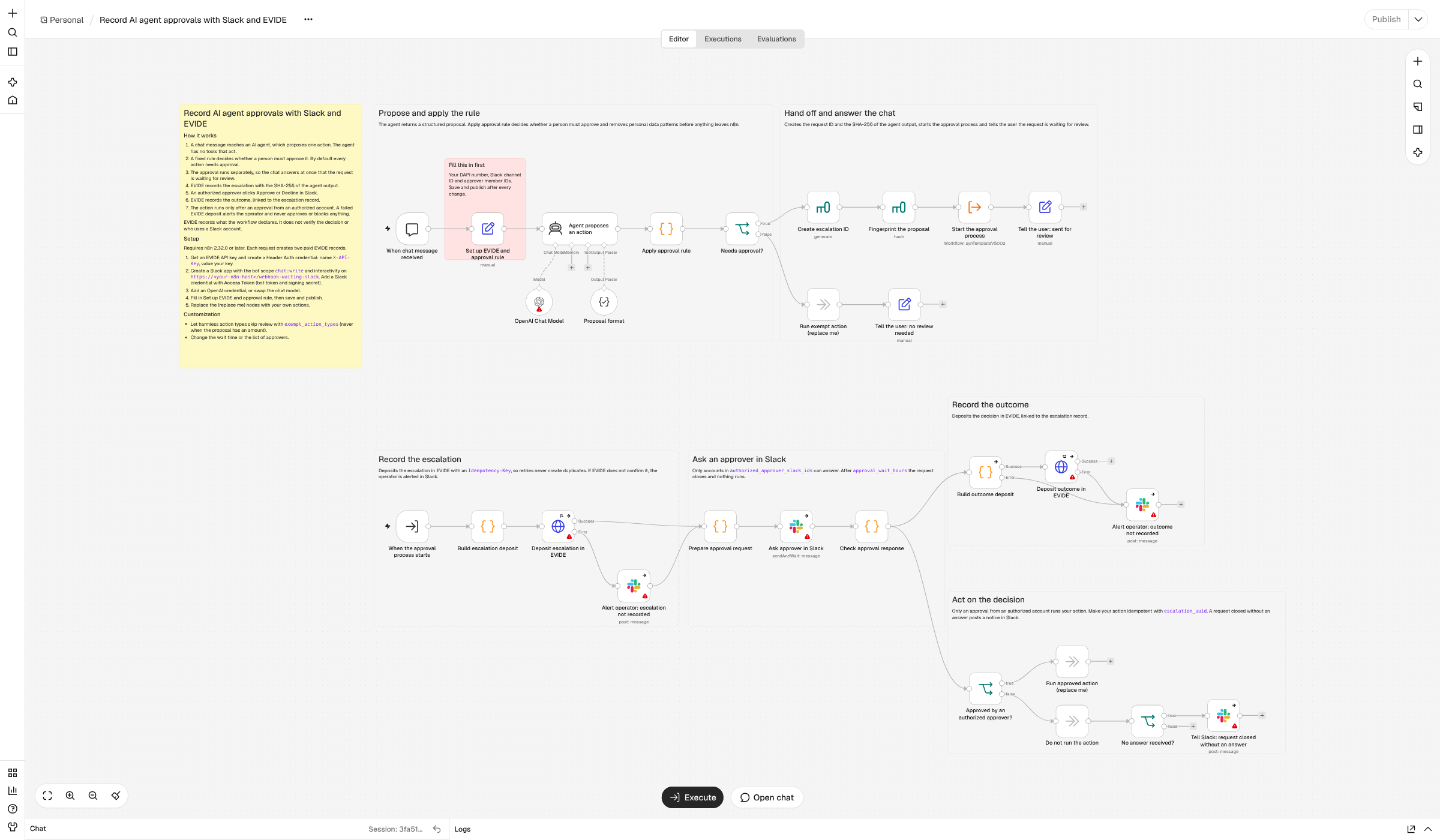
For each approval request the workflow attempts two deposits, linked with chain.parent_evide_id.
| Escalation (position 1) | Outcome (position 2) | |
|---|---|---|
| When | As soon as the rule requires approval | After the answer in Slack or the wait limit |
| Title | Short and fixed, for example «Escalated for approval: refund 40 EUR» | For example «Approved via Slack: refund 40 EUR» |
| Content | Checked action type, amount, rule reasons, SHA-256 fingerprint of the agent output, references to the n8n execution | Outcome, Slack member ID of the authorized approver, channel and message IDs, declared uncertainties |
| Agent output | Not in the record. EVIDE keeps only the fingerprint; the complete original output stays in n8n execution data. | |
| Verified identity | The DAPI of the API key holder. The approver is a Slack account reported by Slack to n8n. | |
The linked pair of records exists only when EVIDE confirms both deposits. If a deposit is not confirmed, the operator gets an alert in Slack with the error:
- if the escalation is not confirmed, the workflow still attempts the outcome deposit, which may fail as well; if it succeeds, the outcome is recorded without a link and the record states this among its uncertainties;
- if the outcome is not confirmed, the decision taken in Slack does not change, but EVIDE holds only the escalation.
| Outcome | When | Action branch |
|---|---|---|
approved | Approve from an account in the authorized list | yes |
declined | Decline from an account in the authorized list | no |
approval_not_accepted | Approve that cannot be attributed to an authorized account | no |
decline_not_attributed | Decline that cannot be attributed to an authorized account | no |
no_valid_response | Wait limit reached, Slack error or unexpected answer | no |
For the two unattributed outcomes the record states the reason and does not contain the ID of the account that clicked.
- Fail-closed rule: if the configuration is incomplete or ambiguous, human review stays mandatory.
- Fixed formats: action type in snake_case only, three-letter currency, numeric amount.
- Approvers: the list is checked twice, by the Slack node and by the workflow. Only the ID of an authorized approver is sent to EVIDE.
- Duplicates: each deposit uses an
Idempotency-Key. For 7 days, new attempts with the same key and the same content receive the stored response and create no duplicate records. An execution retried after 7 days creates a new record. - Fingerprint: the SHA-256 is computed on the agent output exactly as it reaches the workflow, not normalized or truncated. It does not cover the model's raw text before the parser, which the workflow cannot see.
Idempotency-Key protects the EVIDE deposits, not your action. If you retry an execution, n8n runs the action node again: make it idempotent using escalation_uuid.- EVIDE records what the workflow declares, with its own receipt time and integrity data.
- It does not verify the decision, the agent output or who uses a Slack account.
- An approval record does not show that the action was executed.
- The fingerprint lets you check a copy of the agent output later, but it does not keep the output: the output stays in n8n execution data, which can be deleted according to the retention policy configured in the instance. If you need it, store it in your own system.
- n8n 2.32.0 or later, self-hosted or Cloud. It is the first release with the Slack options «Capture Who Responded» and «Restrict Who Can Approve».
- An EVIDE account with a verified DAPI identity and an API key accepted in the profile, with billing confirmed.
- A Slack workspace where you can install an app with interactivity.
- An OpenAI key, or another model node.
- Your own operational action, to connect in place of the placeholder nodes.
Standard n8n nodes only, no community nodes. Each confirmed deposit is a paid EVIDE record: for each approval request the workflow attempts two. See Pricing.
403 client_activation_pending or 403 billing_not_confirmed.X-API-Key and your key as the value. In the «Set up EVIDE and approval rule» node enter the endpoint, DAPI number, Slack channel and approvers, then save and publish. The SETUP.md file in the zip describes every step.escalation_uuid.| Environment | What was tested |
|---|---|
| n8n 2.32.0 and 2.47.7 self-hosted, with a local copy of EVIDE | Every branch: approved, declined, unauthorized click, wait limit, EVIDE unreachable, wrong DAPI, lost HTTP response with a retry and no duplicate record |
| Code node logic | 47 checks: rule, filters, fingerprint, outcomes, idempotency, chain, title length |
| n8n Cloud 2.47.7, real Slack, gpt-5-mini, with an EVIDE stand-in that deposits nothing | The real scenarios, including a chat closed right after sending, a click from an unauthorized account and a click after the wait limit |
| EVIDE in production, test identity | Three complete cycles (approved, declined, expired), that is six linked records, checked in the EVIDE portal: chain, positions, DAPI and EAR |
The three production cycles were run with the previous version of the template. The later changes (short titles, closing notice in Slack) were tested on n8n Cloud with the EVIDE stand-in. The downloadable version differs from the tested one only in the canvas notes, the workflow name and the endpoint left as a placeholder.
The zip contains the template to import into n8n with «Import from File» and the setup guide SETUP.md, in English. The template contains no credentials, which you create in n8n, and leaves the endpoint as a placeholder: you receive it together with the API key.
EVIDE API Documentation: app.certifywebcontent.com/docs/evide-intake-schema/
EVIDE MCP Server: app.certifywebcontent.com/docs/evide-mcp/
DAPI identity: dapi-certification.com
Pricing and service conditions: app.certifywebcontent.com/pricing
API access: info@certifywebcontent.com
For each approval request, two linked deposits: the escalation and the outcome.
The action branch is enabled only after an authorized approval.
The declaration stays outside the system that acted.